Case study
Real packs, checked by the CorrectMED teamA real receipt, real packs, and what came back.
The CorrectMED team bought these packs over the counter at a pharmacy in Abuja, with one itemised receipt. The team photographed the receipt and the packs and put them through CorrectMED the way a receiving desk would, with a script doing the clicking. This page shows the reads and the results as they came back: what CorrectMED AI read, where it was wrong, what it could not read and what the check made of it. The only edit to anything CorrectMED returned was setting the unit to packs on the three lines, shown in the quantity rows of the check where it happened.
5
photos read
one receipt and the packs
3
receipt lines checked
each with its own result
29 of 33
printed values right
36 more fields were correctly left blank, as nothing is printed there. 8 of 8 judgements about the photo, such as which side of the pack, were also right. Four more fields couldn't be settled from the print and are left out, listed below
4
printed values wrong
of 33, plus one invented value where nothing is printed. All are listed below
01
What went in
Three items bought over the counter at a pharmacy in Abuja with an itemised receipt: Oral-B family toothpaste, Zolat caplet and Emzor ParaNight. The toothpaste is not a medicine. The receipt lists a quantity of one for each item.
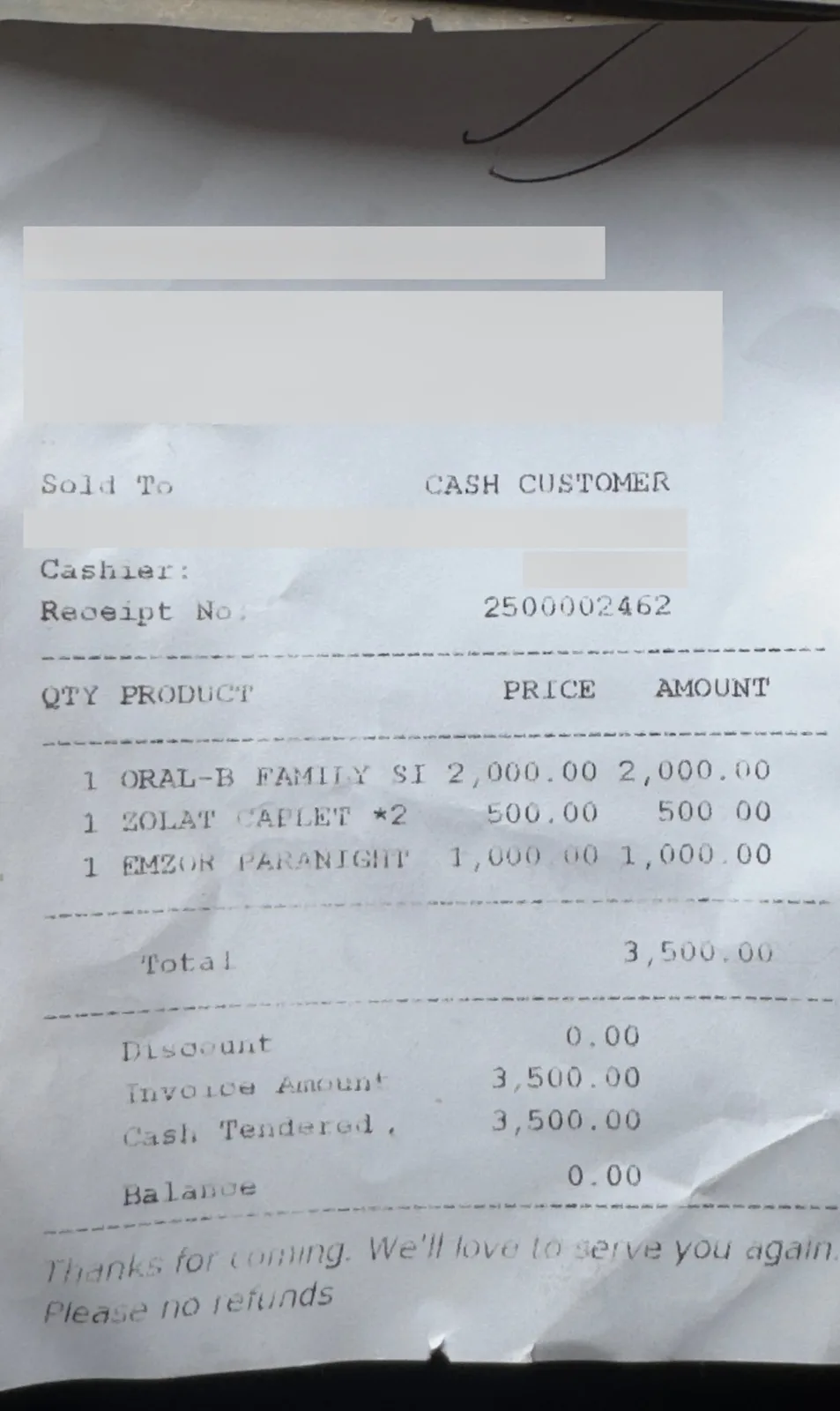
Receipt lines, as printed
| Qty | Product | Amount |
|---|---|---|
| 1 | ORAL-B FAMILY SI | 2,000.00 |
| 1 | ZOLAT CAPLET *2 | 500.00 |
| 1 | EMZOR PARANIGHT | 1,000.00 |
| Total | 3,500.00 | |
CorrectMED read that same covered copy, so it gave no supplier and no date. The team named the supplier when it made the receipt. The receipt shows the sale; it does not say who made each pack.
Checked by the CorrectMED team on the CorrectMED app, in a sandbox workspace on the local test build, with live CorrectMED AI. The team is not a customer, pilot, partner or user.
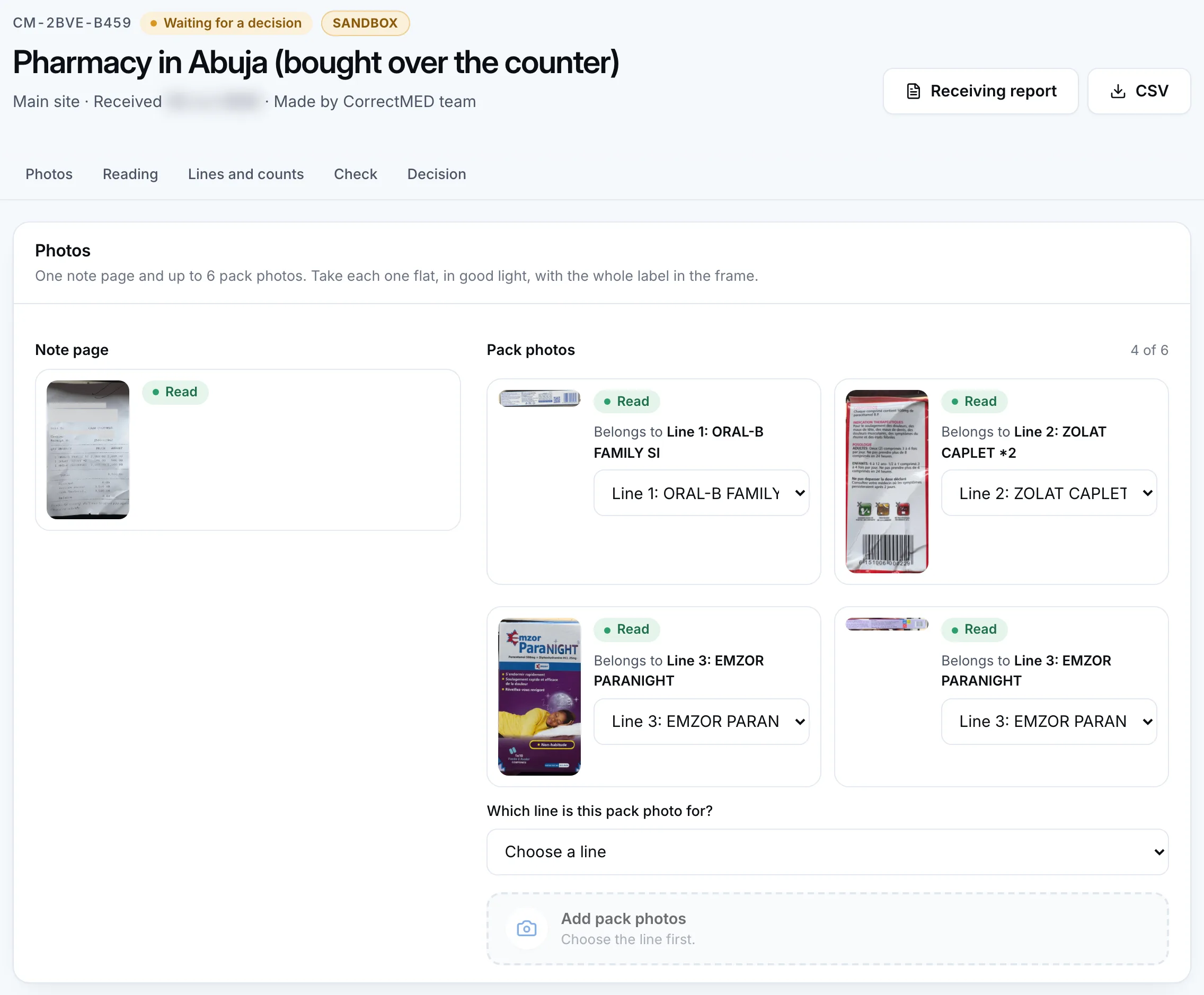
The pack photos
Each pack photo was added to the receipt line a person would choose. The Zolat pack photo shows the back panel only, and no brand name is printed on it. Its link to the ZOLAT CAPLET line rests on the team's word that it is the pack that was bought. The toothpaste photo is the same: its face prints only the P&G logo and the word Toothpaste, so its link to line 1 also rests on the team’s word.
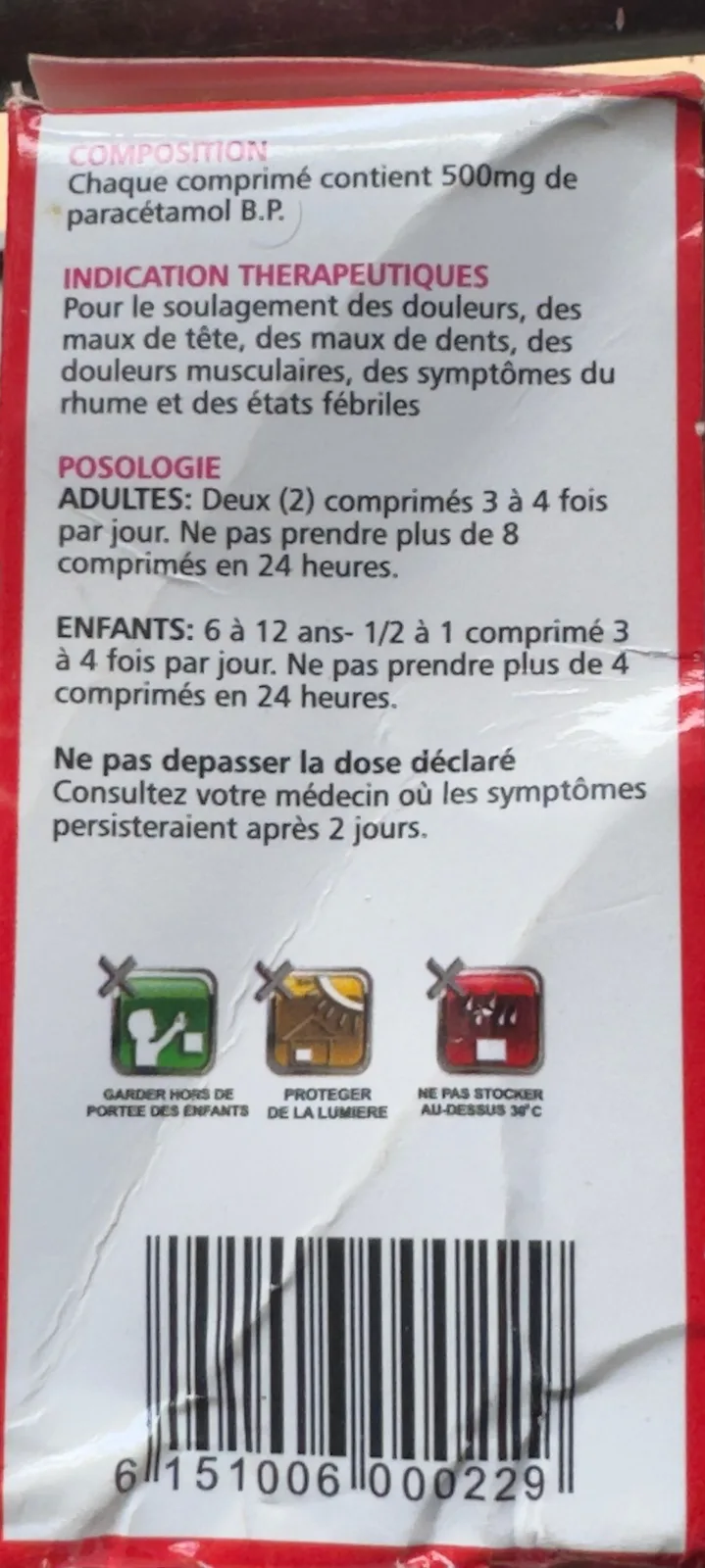
Red carton, back panel. French panel with no brand name. Bought as line 2. 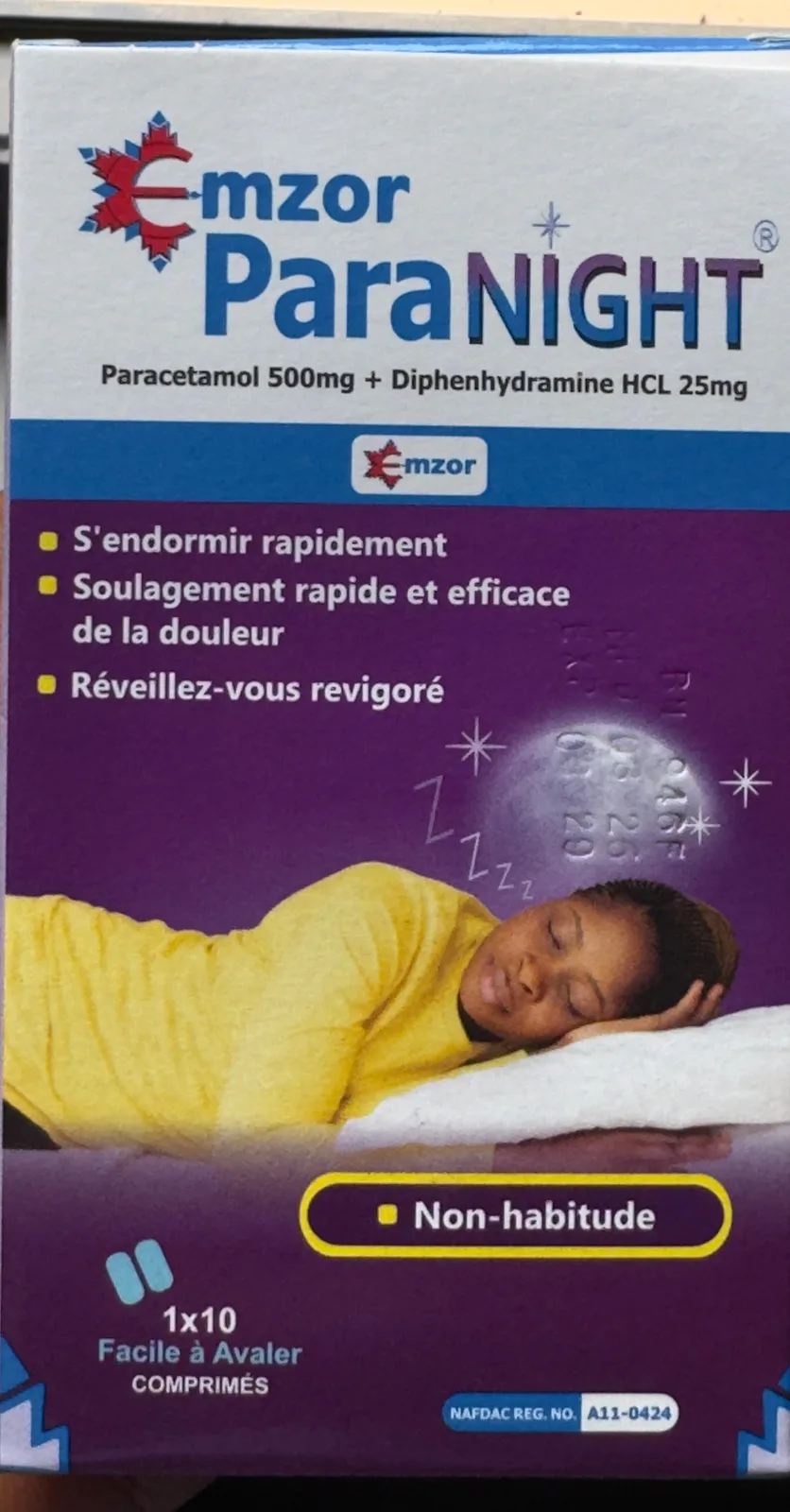
Emzor ParaNight carton, front. Bought as line 3. The batch is embossed on the moon. 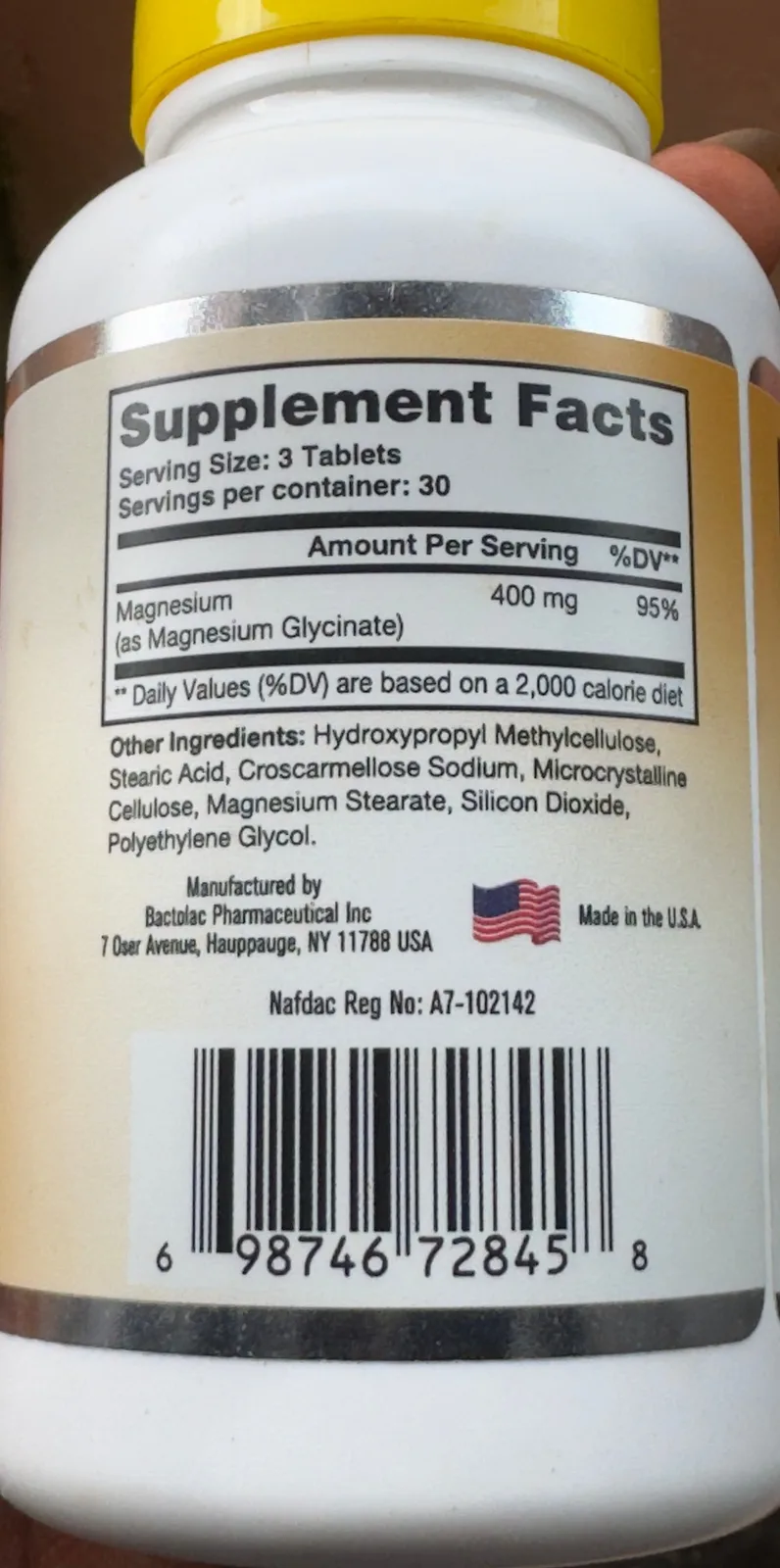
Magnesium glycinate bottle. Not on the receipt, never uploaded, never read.
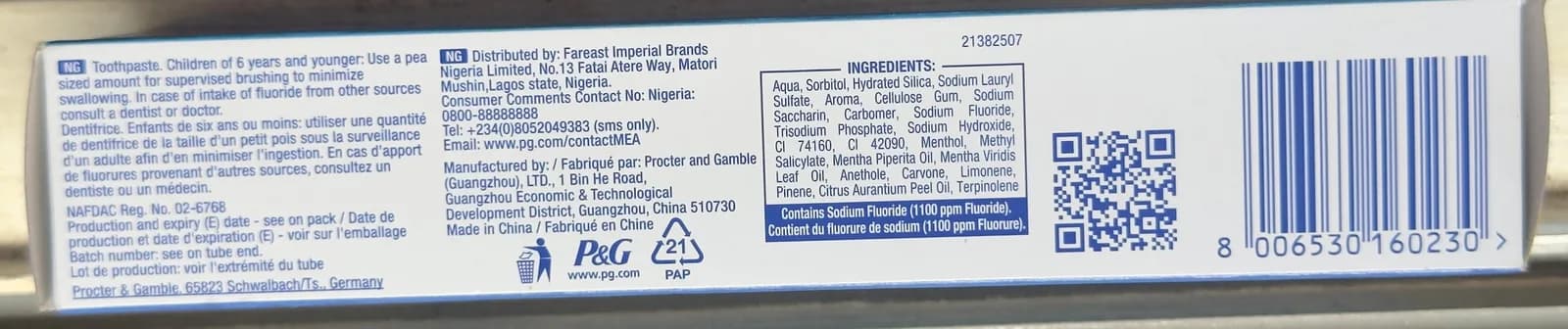
Toothpaste carton (P&G), long side panel. Not a medicine. Bought as line 1. 
Emzor ParaNight carton, side panel. Narrow panel, cut off at the left edge. Bought as line 3.
A magnesium glycinate supplement bottle was photographed with the others. It is not on the receipt. The app asks which line a pack photo belongs to before it accepts the photo, and the bottle belongs to no line, so it was not uploaded and CorrectMED AI never read it. The photo is kept only as a picture of what was left out.
How the check was run
A script on the team’s test workspace did the clicking for these steps, and later started the alert run and pressed Run the check again.
- Signed up on the local build and confirmed the address through the local outbox.
- Made a receipt for the supplier "Pharmacy in Abuja (bought over the counter)".
- Added the receipt as the note page and waited for the read.
- Added each pack photo to the line a person would choose.
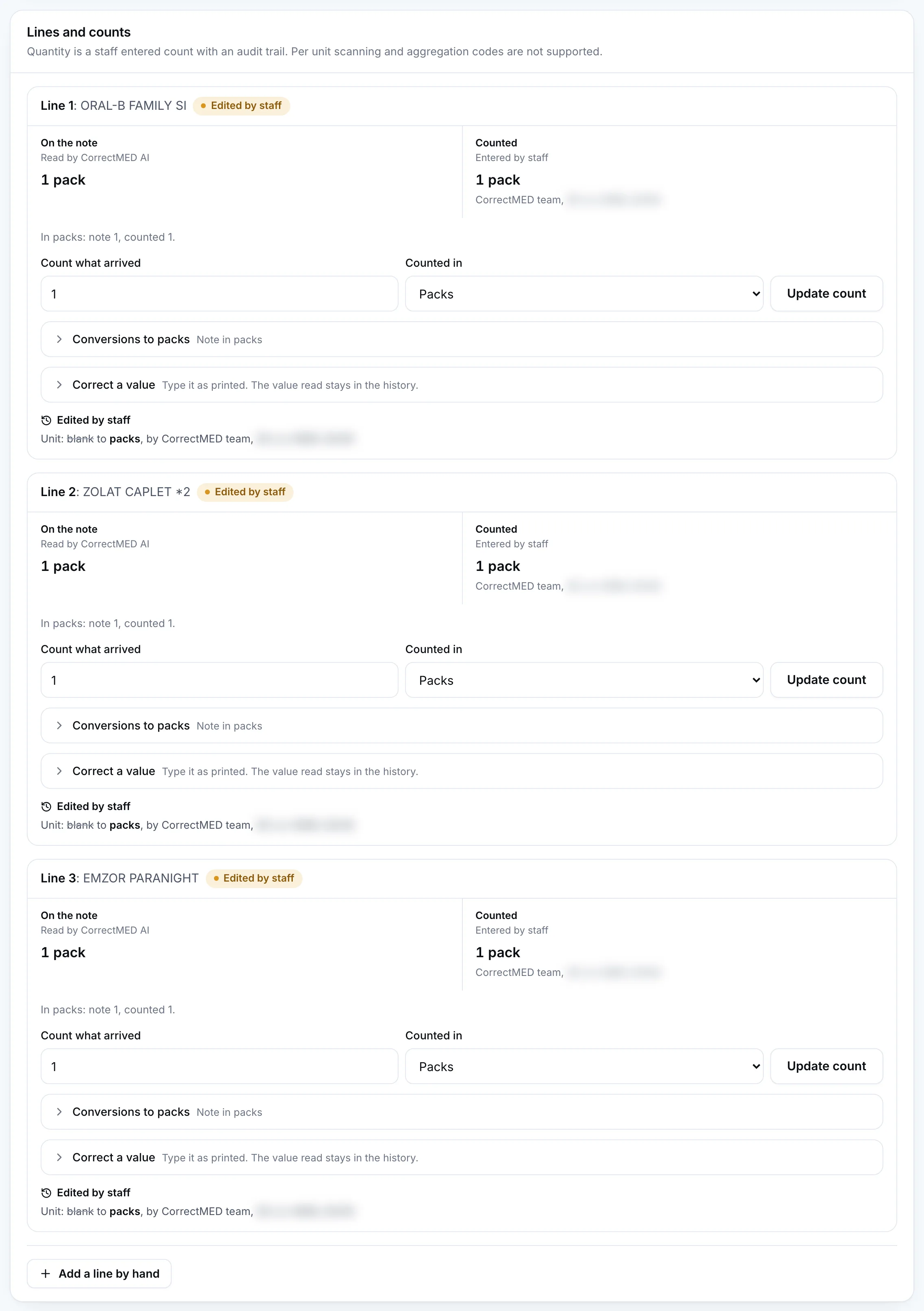
- Counted 1 pack for each of the three lines.
- Because the note gave a quantity without a unit, the app asked what the note counts in, and the team set the unit to packs on each line. The history shows these as edits by staff.
- One run on the local test build. Every photo was read once. The app made one read per photo, started no second reader, and needed no automatic retry.
- The script that drove the desk stopped once at the unit step of the first line, after all five reads had finished. It was continued from the same receipt without starting any read again. The team then set the unit to packs on each line, the only change to what the app returned.
- No decision was recorded. Accept, quarantine and reject are a pharmacist's job, so the receipt is left waiting for a decision.
02
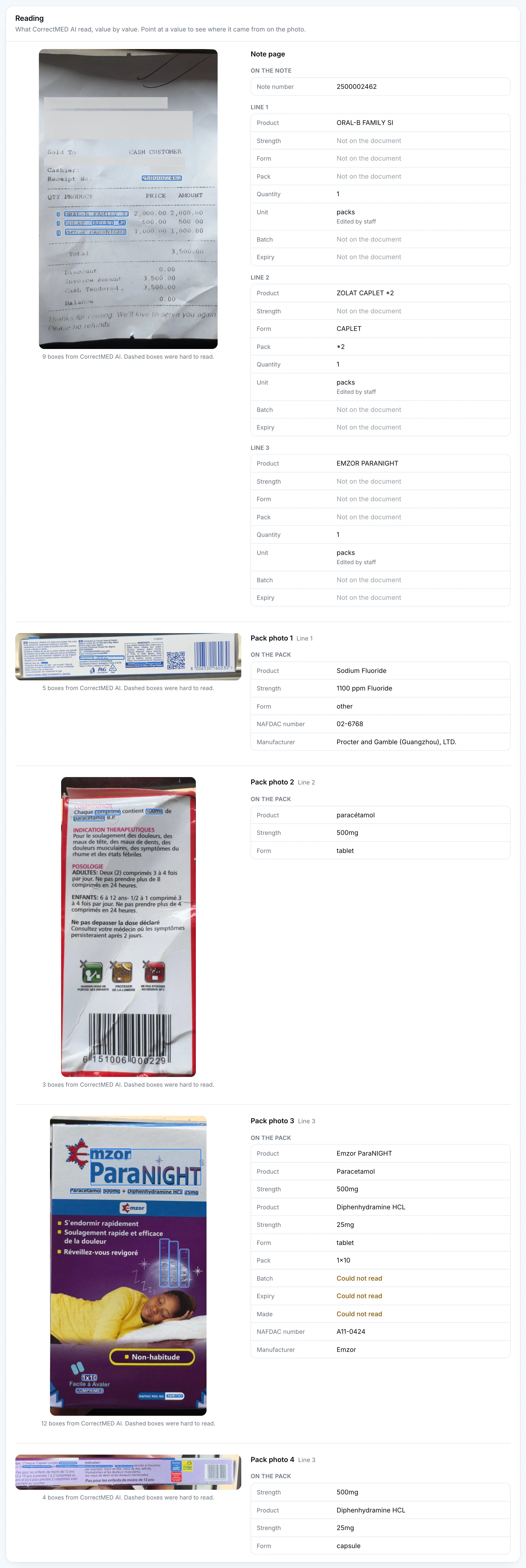
What CorrectMED AI read
For each photo, the boxes are the ones CorrectMED AI drew, in its own coordinates, and the list beside it is what it returned. A value it is sure of is marked clear. A value it can’t make out is marked unclear, says Could not read, and never reaches the rules that make the result.
The app’s own Reading screens draw no box around a barcode, but the read it stores includes one. The boxes here are the stored ones, so a photo can show more boxes than the Reading screenshot in part 6 does.
Every photo was read once, by the first reader. No second reader started and no read had to be retried.
- Solid blue outline, plain number: clear
- Dashed amber outline, number and a question mark: unclear
- Empty dashed circle: no box on the photo for this value
Photo 1 of 5
The receipt
Pharmacy sales receipt, photographed as it was, with creases
Read in 7.8 s, one attempt
Receipt number
2500002462Clear
- No box
Document type
invoiceNo status from the app
The app can only choose delivery note, invoice or other.
Left out of the counts. Printed: sales receipt (the app can only choose delivery_note, invoice or other). Left out of the totals. Printed title is a sales receipt, the same slip also prints 'Invoice Amount'. The two readings disagreed (sales receipt vs other) and either invoice or other can be defended.
Line 1 product
ORAL-B FAMILY SIClear
Line 1 quantity
1Clear
Line 2 product
ZOLAT CAPLET *2Clear
Line 2 form
CAPLETClear
Line 2 pack
*2Clear
Left out of the counts. Printed: *2. Characters match. Left out of the totals because the receipt does not say what '*2' means, so whether it is a pack size is not settled.
Line 2 quantity
1Clear
Line 3 product
EMZOR PARANIGHTClear
Line 3 quantity
1Clear
Not on the document
- Header: Supplier, Date (covered on the published copy)
- Line 1: strength, form, pack, unit, batch, expiry
- Line 2: strength, unit, batch, expiry
- Line 3: strength, form, pack, unit, batch, expiry
- Part of the page is covered.
Photo 2 of 5
Toothpaste carton (P&G), long side panel
Not a medicine. Bought as line 1.
Read in 8 s, one attempt
Swipe to see the whole panel
Form
otherClear
NAFDAC number
02-6768Clear
Manufacturer
Procter and Gamble (Guangzhou), LTD.Clear
Barcode
8006530160230Clear
Active ingredient, name
Sodium FluorideClear
Active ingredient, strength
1100 ppm FluorideClear
Not on this side of the pack
- Product name, Pack size, Batch, Made, Expiry
- CorrectMED AI's note: Product name is not printed on this panel.
- The boxes on this panel are drawn exactly as CorrectMED AI returned them, and some sit loosely on the text. Box 1, for the form, is a thin line above the printed text. Box 2, for the NAFDAC number, sits on the top half of the number. Boxes 5 and 6, for the active ingredient, sit side by side on the same line. Trust the list for the values and the photo for roughly where to look.
Photo 3 of 5
Red carton, back panel
French panel with no brand name. Bought as line 2.
Read in 5.1 s, one attempt
Form
tabletClear
Barcode
6151006000229Clear
Active ingredient, name
paracétamolClear
Active ingredient, strength
500mgClear
Not on this side of the pack
- Product name, Pack size, Batch, Made, Expiry, NAFDAC number, Manufacturer
- CorrectMED AI's note: French packaging panel showing composition, indication thérapeutiques, posologie, and barcode. Product name is absent on this face.
Photo 4 of 5
Emzor ParaNight carton, front
Bought as line 3. The batch is embossed on the moon.
Read in 5 s, one attempt
Product name
Emzor ParaNIGHTClear
Form
tabletClear
Pack size
1x10Clear
Batch
Could not readUnclear
The unclear read was 846F. No check uses it.
Unclear and wrong. Printed: ?46F (first character is a single ring, 0, O or Q; 4, 6 and F are fairly sure). Embossed on the moon graphic. The first character is one ring with no waist, so it is not an 8; the other three characters match. The app did mark it unclear.
Made
Could not readUnclear
The unclear read was 03 26. No check uses it.
Left out of the counts. Printed: MFD 03 26 (the 3 could be an 8, the 6 could be a 5). Embossed; digits only partly legible.
Expiry
Could not readUnclear
The unclear read was 03 29. No check uses it.
Left out of the counts. Printed: 0? 29 (second month digit and separator not legible). Embossed; the month cannot be read, so '03' cannot be confirmed.
NAFDAC number
A11-0424Clear
Manufacturer
EmzorClear
Invented. Printed: not printed on this face. The Emzor logo is printed as the brand and no manufacturer statement is on this face. Both blind readings recorded the field as not printed. The app returned Emzor and marked it clear, so it took the brand logo as the manufacturer.
Active ingredient 1, name
ParacetamolClear
Active ingredient 1, strength
500mgClear
Active ingredient 2, name
Diphenhydramine HCLClear
Active ingredient 2, strength
25mgClear
Not on this side of the pack
- Barcode
Photo 5 of 5
Emzor ParaNight carton, side panel
Narrow panel, cut off at the left edge. Bought as line 3.
Read in 4.5 s, one attempt
Swipe to see the whole panel
Form
capsuleClear
Misread. Printed: Caplet (printed 'Chaque Caplet contient'; the app's list has no caplet, tablet is the nearest). A caplet is not a capsule. The app marked it clear.
Barcode
6 134000 034092Clear
Misread. Printed: 6 154000 034092. The third digit is a 5 (flat top, and it is the only digit that makes the check digit valid); the app read a 3. The app's number fails its own check digit and was marked clear.
- No box
Active ingredient 1, name
Could not readUnclear
Nothing came back for it.
Unclear and wrong. Printed: 'ol' (the end of Paracetamol; the rest is cut off by the photo edge). The app marked it unclear, which fits a cut-off name, but returned no text at all, so there is no right text to credit. The photo edge is the cause.
Active ingredient 1, strength
500mgClear
Active ingredient 2, name
Diphenhydramine HCLClear
Active ingredient 2, strength
25mgClear
Not on this side of the pack
- Product name, Pack size, Batch, Made, Expiry, NAFDAC number, Manufacturer
- The photo cuts part of the panel off.
- The boxes on this narrow panel are drawn exactly as CorrectMED AI returned them, and several sit loosely on the text. Box 5, for 25mg, lies on the indication line to the right of where 25mg is printed, at the end of the ingredient line. Trust the list for the value and the photo for roughly where to look.
03
What the check found
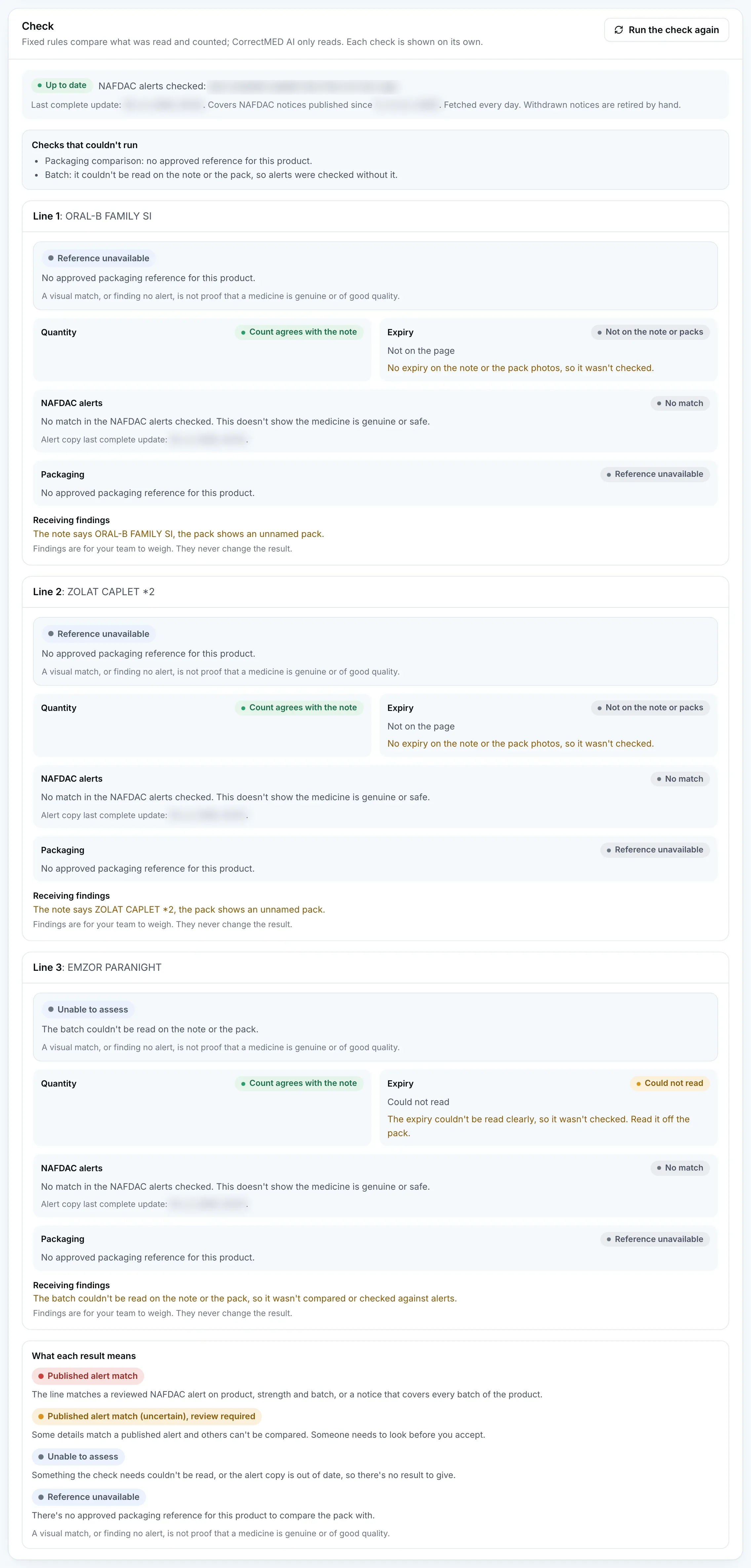
Fixed rules, not AI, compare what was read with the note, the team’s counts and the published NAFDAC alerts, and pick one result per line. These are the app’s own results and words for audit ID CM-2BVE-B459.
Line 1
ORAL-B FAMILY SI
No approved packaging reference for this product.
- Quantity
Count agrees with the note
The note prints 1 with no unit; the team set the unit to packs and counted 1 pack.- Expiry
Not on the note or packs
No expiry on the note or the pack photos, so it wasn't checked.- NAFDAC alerts
No match
No match in the NAFDAC alerts checked. This doesn't show the medicine is genuine or safe.- Packaging
Reference unavailable
No approved packaging reference for this product.
Receiving findings
- The note says ORAL-B FAMILY SI, the pack shows an unnamed pack.
Findings are for your team to weigh. They never change the result.
Checks that couldn’t run
- Packaging comparison: no approved reference for this product.
Line 2
ZOLAT CAPLET *2
No approved packaging reference for this product.
- Quantity
Count agrees with the note
The note prints 1 with no unit; the team set the unit to packs and counted 1 pack.- Expiry
Not on the note or packs
No expiry on the note or the pack photos, so it wasn't checked.- NAFDAC alerts
No match
No match in the NAFDAC alerts checked. This doesn't show the medicine is genuine or safe.- Packaging
Reference unavailable
No approved packaging reference for this product.
Receiving findings
- The note says ZOLAT CAPLET *2, the pack shows an unnamed pack.
Findings are for your team to weigh. They never change the result.
Checks that couldn’t run
- Packaging comparison: no approved reference for this product.
Line 3
EMZOR PARANIGHT
The batch couldn't be read on the note or the pack.
- Quantity
Count agrees with the note
The note prints 1 with no unit; the team set the unit to packs and counted 1 pack.- Expiry
Could not read
The expiry couldn't be read clearly, so it wasn't checked. Read it off the pack.- NAFDAC alerts
No match
No match in the NAFDAC alerts checked. This doesn't show the medicine is genuine or safe.- Packaging
Reference unavailable
No approved packaging reference for this product.
Receiving findings
- The batch couldn't be read on the note or the pack, so it wasn't compared or checked against alerts.
Findings are for your team to weigh. They never change the result.
Checks that couldn’t run
- Packaging comparison: no approved reference for this product.
- Batch: it couldn't be read on the note or the pack, so alerts were checked without it.
The alert check, run twice
- The run’s own check. It used a local copy of the NAFDAC alerts that held 422 notice rows. None had been checked and approved, so an exact match could not happen. Every line said No match, and that said nothing about whether these products appear in a NAFDAC notice.
- The copy, brought to its checked state. The app’s own alert run, the one it makes every day, was then started from a script on the team’s workspace. It confirmed all 89 stored notices against NAFDAC by their ids (none changed, none new). Its automatic text check then approved 294 of the 422 rows, the ones whose product, strength, batches and NAFDAC number appear word for word in the notice. 66 medicine rows still wait for a person, and 62 rows are not medicines. The run made no CorrectMED AI calls.
- The check, run again. A script then pressed Run the check again on the team’s receipt. That works out the check again from what was already read and counted. No photo was uploaded and none was read again: the receipt still shows 5 reads, one for each photo.
- What came back. Every line gave the same result as the first check, with the same NAFDAC alert status and the same findings. No row in the alert copy names any of these products. For lines 2 and 3 this time No match is an answer from the approved alert copy, not the result of nothing being approved. The 66 medicine rows still waiting for a person are in the check as well and could still give an uncertain match for a person to look at. None did. Line 1 is toothpaste, and the alert check skips notices about non medicines, so a notice about a toothpaste could never match: its No match is not an answer about toothpaste notices. No match in the NAFDAC alerts checked. This doesn't show the medicine is genuine or safe.
Line 1ORAL-B FAMILY SI
- First check
- No match, no matches
- Run again
- No match, no matches
Reference unavailable. The result and the findings are the same as the first check.
Line 2ZOLAT CAPLET *2
- First check
- No match, no matches
- Run again
- No match, no matches
Reference unavailable. The result and the findings are the same as the first check.
Line 3EMZOR PARANIGHT
- First check
- No match, no matches
- Run again
- No match, no matches
Unable to assess. The result and the findings are the same as the first check.
The Check screenshot in part 6 was taken at the first check. After the re-check the section looked the same, because every line gave the same result.
No decision was recorded. Accept, quarantine and reject are a pharmacist's job, so the receipt is left waiting for a decision.
04
How accurate the reading was
Two independent blind readings of the original photos were made at full size by AI readers separate from CorrectMED AI, without sight of what CorrectMED AI returned or of each other. Where the two agreed, that is the truth the read is scored against. Where they differed or the print could not be settled, the original was looked at again, and anything still uncertain is listed below and left out of the counts. One barcode digit on the Emzor side panel is blurred at full size, so it is fixed by the barcode’s check digit, not by sight. CorrectMED AI read the web size copy of each photo shown on this page, while the scoring looked at the full size originals with zoomed crops.
29 of 33 printed values right, 4 wrong
36 more fields print nothing, and CorrectMED AI correctly left them blank. 8 of 8 judgements about the photo (whether it is a pack, and which side of the pack) were also right; they are not printed text, so they are not in the printed count. One more prints nothing and CorrectMED AI still gave a value, which counts as invented. Together that is 78 fields scored.
Read exactly
37
Correctly left blank
36
Unclear, right
0
Unclear and wrong
2
Misread
2
Missed
0
Invented
1
78 values scored across 5 photos: the receipt 24, the toothpaste panel 13, the red carton 13, the Emzor front 13, the Emzor side panel 15.
The summary in words
Across five photos, 78 fields could be scored against the print. 37 were read exactly, 36 were correctly left absent because the face does not print them, 2 were unclear and wrong, 2 were misread, 1 was invented, and none were missed. The two misreads were both on the Emzor side panel and both were marked clear: the app read the form as capsule when the carton says Caplet, and it read the barcode with a 3 where the print has a 5, so that barcode fails its own check digit. The two unclear and wrong reads are the embossed batch on the Emzor front, which came back as 846F when the first character is a single ring (0, O or Q) and not an 8 though the 46F after it is right, and the first active name on the side panel, which the app flagged unclear and gave no text for because the photo cuts the word off. Every embossed value on the Emzor front was marked unclear, which is why that line was left as unable to assess. Four fields are left out of the counts because the print or the definition cannot be settled: the embossed manufacture date and expiry (partly legible), whether the receipt's '*2' is a pack size, and whether a sales receipt that prints 'Invoice Amount' is an invoice or other. The invented value is the manufacturer on the Emzor front: the face prints the Emzor logo as the brand and no manufacturer statement, both blind readings recorded the field as not printed, and the app returned Emzor marked clear, so it took the brand logo as the manufacturer. The Oral-B and Zolat packs print no product name on the faces photographed, so the app correctly returned none, which is why the check showed those two lines as an unnamed pack. The magnesium bottle was never uploaded and is not scored. Most of the exact reads are short, printed text on clean cartons, and the fields the app got wrong are the hard ones: an embossed code, a blurred barcode digit, a word cut off by the photo edge and a brand logo taken as a manufacturer.
Where it was wrong
Misreadthe Emzor side panel
Form
- Printed
- Caplet (printed 'Chaque Caplet contient'; the app's list has no caplet, tablet is the nearest)
- CorrectMED AI read
- capsule
A caplet is not a capsule. The app marked it clear.
Misreadthe Emzor side panel
Barcode
- Printed
- 6 154000 034092
- CorrectMED AI read
- 6 134000 034092
The third digit is a 5 (flat top, and it is the only digit that makes the check digit valid); the app read a 3. The app's number fails its own check digit and was marked clear.
Unclear and wrongthe Emzor front
Batch
- Printed
- ?46F (first character is a single ring, 0, O or Q; 4, 6 and F are fairly sure)
- CorrectMED AI read
- 846F (unclear)
Embossed on the moon graphic. The first character is one ring with no waist, so it is not an 8; the other three characters match. The app did mark it unclear.
Inventedthe Emzor front
Manufacturer
- Printed
- nothing
- CorrectMED AI read
- Emzor
The Emzor logo is printed as the brand and no manufacturer statement is on this face. Both blind readings recorded the field as not printed. The app returned Emzor and marked it clear, so it took the brand logo as the manufacturer.
Unclear and wrongthe Emzor side panel
Active ingredient 1, name
- Printed
- 'ol' (the end of Paracetamol; the rest is cut off by the photo edge)
- CorrectMED AI read
- no text (unclear)
The app marked it unclear, which fits a cut-off name, but returned no text at all, so there is no right text to credit. The photo edge is the cause.
It missed no printed value. It gave one value where nothing is printed: manufacturer on the Emzor front.
Left out of the counts
These values could not be settled from the print, or depend on a definition, so they are not counted as right or wrong.
Document typethe receipt
- Printed
- sales receipt (the app can only choose delivery_note, invoice or other)
- CorrectMED AI read
- invoice
Document type is a closed-list judgement: the slip is a pharmacy sales receipt that also prints the words 'Invoice Amount'. 'invoice' and 'other' are both defensible.
Line 2 packthe receipt
- Printed
- *2
- CorrectMED AI read
- *2
The characters '*2' are printed and the app copied them exactly, but the receipt does not say what they mean, so whether they count as a pack size is a judgement.
Madethe Emzor front
- Printed
- MFD 03 26 (the 3 could be an 8, the 6 could be a 5)
- CorrectMED AI read
- 03 26 (unclear)
Embossed digits: the 3 could be an 8 and the 6 could be a 5; the two readings could not settle it.
Expirythe Emzor front
- Printed
- 0? 29 (second month digit and separator not legible)
- CorrectMED AI read
- 03 29 (unclear)
Embossed: the second month digit and the separator are not legible, so the app's '03' cannot be confirmed or rejected. The year 29 and the first month digit 0 look right.
Magnesium glycinate bottle
Not on the receipt and never uploaded to the app (the app needs a line first), so the app made no read to score.
Every value, photo by photo
Pharmacy sales receipt, three lines24 scored
Receipt numberRead exactly
- Printed
- 2500002462
- CorrectMED AI read
- 2500002462
Ten digits, identical to the print.
Document typeLeft out of the counts
- Printed
- sales receipt (the app can only choose delivery_note, invoice or other)
- CorrectMED AI read
- invoice
Left out of the totals. Printed title is a sales receipt, the same slip also prints 'Invoice Amount'. The two readings disagreed (sales receipt vs other) and either invoice or other can be defended.
SupplierOut of scope
- Printed
- redacted
- CorrectMED AI read
- nothing
Redacted in the copy the app reads; not scored.
DateOut of scope
- Printed
- redacted
- CorrectMED AI read
- nothing
Redacted in the copy the app reads; not scored.
Line 1 productRead exactly
- Printed
- ORAL-B FAMILY SI
- CorrectMED AI read
- ORAL-B FAMILY SI
Print is partly faded or clipped (a letter in the name); every character matched, though the app marked it clear.
Line 1 strengthCorrectly left blank
- Printed
- nothing
- CorrectMED AI read
- nothing
No strength printed on the receipt.
Line 1 formCorrectly left blank
- Printed
- nothing
- CorrectMED AI read
- nothing
No form column on the receipt.
Line 1 packCorrectly left blank
- Printed
- nothing
- CorrectMED AI read
- nothing
No pack size printed.
Line 1 quantityRead exactly
- Printed
- 1
- CorrectMED AI read
- 1
Line 1 unitCorrectly left blank
- Printed
- nothing
- CorrectMED AI read
- nothing
No unit printed; the app read it as absent. The team later set it to packs.
Line 1 batchCorrectly left blank
- Printed
- nothing
- CorrectMED AI read
- nothing
No batch on the receipt.
Line 1 expiryCorrectly left blank
- Printed
- nothing
- CorrectMED AI read
- nothing
No expiry on the receipt.
Line 2 productRead exactly
- Printed
- ZOLAT CAPLET *2
- CorrectMED AI read
- ZOLAT CAPLET *2
Print is partly faded or clipped (a letter in the name); every character matched, though the app marked it clear.
Line 2 strengthCorrectly left blank
- Printed
- nothing
- CorrectMED AI read
- nothing
No strength printed on the receipt.
Line 2 formRead exactly
- Printed
- CAPLET
- CorrectMED AI read
- CAPLET
Printed as part of the product text.
Line 2 packLeft out of the counts
- Printed
- *2
- CorrectMED AI read
- *2
Characters match. Left out of the totals because the receipt does not say what '*2' means, so whether it is a pack size is not settled.
Line 2 quantityRead exactly
- Printed
- 1
- CorrectMED AI read
- 1
Line 2 unitCorrectly left blank
- Printed
- nothing
- CorrectMED AI read
- nothing
No unit printed; the app read it as absent. The team later set it to packs.
Line 2 batchCorrectly left blank
- Printed
- nothing
- CorrectMED AI read
- nothing
No batch on the receipt.
Line 2 expiryCorrectly left blank
- Printed
- nothing
- CorrectMED AI read
- nothing
No expiry on the receipt.
Line 3 productRead exactly
- Printed
- EMZOR PARANIGHT
- CorrectMED AI read
- EMZOR PARANIGHT
Print is partly faded or clipped (a letter in the name); every character matched, though the app marked it clear.
Line 3 strengthCorrectly left blank
- Printed
- nothing
- CorrectMED AI read
- nothing
No strength printed on the receipt.
Line 3 formCorrectly left blank
- Printed
- nothing
- CorrectMED AI read
- nothing
No form column on the receipt.
Line 3 packCorrectly left blank
- Printed
- nothing
- CorrectMED AI read
- nothing
No pack size printed.
Line 3 quantityRead exactly
- Printed
- 1
- CorrectMED AI read
- 1
Line 3 unitCorrectly left blank
- Printed
- nothing
- CorrectMED AI read
- nothing
No unit printed; the app read it as absent. The team later set it to packs.
Line 3 batchCorrectly left blank
- Printed
- nothing
- CorrectMED AI read
- nothing
No batch on the receipt.
Line 3 expiryCorrectly left blank
- Printed
- nothing
- CorrectMED AI read
- nothing
No expiry on the receipt.
Oral-B toothpaste carton, long side panel (toothpaste, not a medicine)13 scored
Is it a packRead exactly
- Printed
- true
- CorrectMED AI read
- true
A pack (carton); not a medicine.
Which side of the packRead exactly
- Printed
- side
- CorrectMED AI read
- side
Product nameCorrectly left blank
- Printed
- nothing
- CorrectMED AI read
- nothing
The panel prints only the generic word 'Toothpaste.' and the P&G logo; the Oral-B name is not on this face. The app flagged this in its own note.
Active ingredient 1, nameRead exactly
- Printed
- Sodium Fluoride
- CorrectMED AI read
- Sodium Fluoride
Active ingredient 1, strengthRead exactly
- Printed
- 1100 ppm Fluoride
- CorrectMED AI read
- 1100 ppm Fluoride
FormRead exactly
- Printed
- Toothpaste (the app's form list has no toothpaste, so other is the correct choice)
- CorrectMED AI read
- other
Fixed list; other is right for toothpaste.
Pack sizeCorrectly left blank
- Printed
- nothing
- CorrectMED AI read
- nothing
Not printed on this face; read as absent.
BatchCorrectly left blank
- Printed
- nothing
- CorrectMED AI read
- nothing
The carton says the batch is on the tube end, which is not in the photo.
MadeCorrectly left blank
- Printed
- nothing
- CorrectMED AI read
- nothing
The carton says the production date is on the tube end or the pack, not in the photo.
ExpiryCorrectly left blank
- Printed
- nothing
- CorrectMED AI read
- nothing
Not in the photo.
NAFDAC numberRead exactly
- Printed
- 02-6768
- CorrectMED AI read
- 02-6768
ManufacturerRead exactly
- Printed
- Procter and Gamble (Guangzhou), LTD.
- CorrectMED AI read
- Procter and Gamble (Guangzhou), LTD.
The street address printed after the name was not part of the read.
BarcodeRead exactly
- Printed
- 8 006530 160230
- CorrectMED AI read
- 8006530160230
Spacing only; the check digit is valid.
Red carton, French back panel (the pack for the ZOLAT line; no brand name on this face)13 scored
Is it a packRead exactly
- Printed
- true
- CorrectMED AI read
- true
Which side of the packRead exactly
- Printed
- back
- CorrectMED AI read
- back
Product nameCorrectly left blank
- Printed
- nothing
- CorrectMED AI read
- nothing
The brand name Zolat is not printed on this face.
Active ingredient 1, nameRead exactly
- Printed
- paracétamol (printed 'paracétamol B.P.')
- CorrectMED AI read
- paracétamol
B.P. is the pharmacopoeia mark after the name and was not part of the read.
Active ingredient 1, strengthRead exactly
- Printed
- 500mg
- CorrectMED AI read
- 500mg
FormRead exactly
- Printed
- comprimé
- CorrectMED AI read
- tablet
Fixed list; comprimé is tablet.
Pack sizeCorrectly left blank
- Printed
- nothing
- CorrectMED AI read
- nothing
Not printed on this face; read as absent.
BatchCorrectly left blank
- Printed
- nothing
- CorrectMED AI read
- nothing
Not printed on this face; read as absent.
MadeCorrectly left blank
- Printed
- nothing
- CorrectMED AI read
- nothing
Not printed on this face; read as absent.
ExpiryCorrectly left blank
- Printed
- nothing
- CorrectMED AI read
- nothing
Not printed on this face; read as absent.
NAFDAC numberCorrectly left blank
- Printed
- nothing
- CorrectMED AI read
- nothing
No NAFDAC number on this face.
ManufacturerCorrectly left blank
- Printed
- nothing
- CorrectMED AI read
- nothing
Not printed on this face; read as absent.
BarcodeRead exactly
- Printed
- 6 151006 000229
- CorrectMED AI read
- 6151006000229
Spacing only; the check digit is valid.
Emzor ParaNight carton, front, with the embossed batch, manufacture and expiry block13 scored
Is it a packRead exactly
- Printed
- true
- CorrectMED AI read
- true
Which side of the packRead exactly
- Printed
- front
- CorrectMED AI read
- front
Product nameRead exactly
- Printed
- Emzor ParaNIGHT
- CorrectMED AI read
- Emzor ParaNIGHT
Active ingredient 1, nameRead exactly
- Printed
- Paracetamol
- CorrectMED AI read
- Paracetamol
Active ingredient 1, strengthRead exactly
- Printed
- 500mg
- CorrectMED AI read
- 500mg
Active ingredient 2, nameRead exactly
- Printed
- Diphenhydramine HCL
- CorrectMED AI read
- Diphenhydramine HCL
Active ingredient 2, strengthRead exactly
- Printed
- 25mg
- CorrectMED AI read
- 25mg
FormRead exactly
- Printed
- COMPRIMÉS
- CorrectMED AI read
- tablet
Fixed list; comprimés is tablets.
Pack sizeRead exactly
- Printed
- 1x10
- CorrectMED AI read
- 1x10
BatchUnclear and wrong
- Printed
- ?46F (first character is a single ring, 0, O or Q; 4, 6 and F are fairly sure)
- CorrectMED AI read
- 846F (unclear)
Embossed on the moon graphic. The first character is one ring with no waist, so it is not an 8; the other three characters match. The app did mark it unclear.
MadeLeft out of the counts
- Printed
- MFD 03 26 (the 3 could be an 8, the 6 could be a 5)
- CorrectMED AI read
- 03 26 (unclear)
Embossed; digits only partly legible.
ExpiryLeft out of the counts
- Printed
- 0? 29 (second month digit and separator not legible)
- CorrectMED AI read
- 03 29 (unclear)
Embossed; the month cannot be read, so '03' cannot be confirmed.
NAFDAC numberRead exactly
- Printed
- A11-0424
- CorrectMED AI read
- A11-0424
ManufacturerInvented
- Printed
- nothing
- CorrectMED AI read
- Emzor
The Emzor logo is printed as the brand and no manufacturer statement is on this face. Both blind readings recorded the field as not printed. The app returned Emzor and marked it clear, so it took the brand logo as the manufacturer.
BarcodeCorrectly left blank
- Printed
- nothing
- CorrectMED AI read
- nothing
No barcode on this face.
Emzor ParaNight carton, narrow side panel (cut off at the left edge)15 scored
Is it a packRead exactly
- Printed
- true
- CorrectMED AI read
- true
Which side of the packRead exactly
- Printed
- side
- CorrectMED AI read
- side
Product nameCorrectly left blank
- Printed
- nothing
- CorrectMED AI read
- nothing
No brand name on the visible part of this panel.
Active ingredient 1, nameUnclear and wrong
- Printed
- 'ol' (the end of Paracetamol; the rest is cut off by the photo edge)
- CorrectMED AI read
- no text (unclear)
The app marked it unclear, which fits a cut-off name, but returned no text at all, so there is no right text to credit. The photo edge is the cause.
Active ingredient 1, strengthRead exactly
- Printed
- 500mg
- CorrectMED AI read
- 500mg
Active ingredient 2, nameRead exactly
- Printed
- Diphenhydramine HCL
- CorrectMED AI read
- Diphenhydramine HCL
Active ingredient 2, strengthRead exactly
- Printed
- 25mg
- CorrectMED AI read
- 25mg
FormMisread
- Printed
- Caplet (printed 'Chaque Caplet contient'; the app's list has no caplet, tablet is the nearest)
- CorrectMED AI read
- capsule
A caplet is not a capsule. The app marked it clear.
Pack sizeCorrectly left blank
- Printed
- nothing
- CorrectMED AI read
- nothing
Not printed on this face; read as absent.
BatchCorrectly left blank
- Printed
- nothing
- CorrectMED AI read
- nothing
Not printed on this face; read as absent.
MadeCorrectly left blank
- Printed
- nothing
- CorrectMED AI read
- nothing
Not printed on this face; read as absent.
ExpiryCorrectly left blank
- Printed
- nothing
- CorrectMED AI read
- nothing
Not printed on this face; read as absent.
NAFDAC numberCorrectly left blank
- Printed
- nothing
- CorrectMED AI read
- nothing
Not printed on this face; read as absent.
ManufacturerCorrectly left blank
- Printed
- nothing
- CorrectMED AI read
- nothing
Not printed on this face; read as absent.
BarcodeMisread
- Printed
- 6 154000 034092
- CorrectMED AI read
- 6 134000 034092
The third digit is a 5 (flat top, and it is the only digit that makes the check digit valid); the app read a 3. The app's number fails its own check digit and was marked clear.
05
What it can't tell you
Each limit here showed up in this check. None is hypothetical.
Not every pack is a medicine.
Toothpaste went through the same desk and was read like any pack. CorrectMED AI read it as a pack with sodium fluoride and a form of other. The check has no reference for toothpaste, so it stays Reference unavailable. The alert check also skips notices about non medicines, so a notice about a toothpaste could never match, and line 1's No match is not an answer about toothpaste notices.
A panel that doesn't print a value gives none.
The toothpaste carton says its batch is on the tube end, which is not in the photo. The red carton's back panel and the Emzor side panel print no batch or expiry. A value that is not in the photo can't be read, and the check says so instead of guessing.
Embossed print is the hardest to read.
The Emzor batch, manufacture and expiry are embossed on a graphic. Every one came back unclear, so the batch could not be compared or checked against alerts and the line is Unable to assess.
Packaging needs an approved reference.
A pack is only compared with a reference a person has approved for that product. There was none for any of these three, so no line could get a packaging comparison.
A photo without a name can't name itself.
The Zolat pack photo shows the back panel only, and no brand name is printed on it. Its link to the ZOLAT CAPLET line rests on the team's word that it is the pack that was bought.
No match is only as good as the alert copy.
At the first check, 422 notice rows were in the local copy and none approved, so an exact match could not happen. After the copy was brought to its checked state (294 rows approved) and the check was run again, the result was the same. 66 medicine rows still wait for a person, so a No match means no match in the approved rows and those rows, and says nothing about a notice that is not in the copy. For line 1, the toothpaste, a notice about a toothpaste could never match, because the alert check skips notices about non medicines; a medicine notice that shared its name still could.
It checks what it is given.
The magnesium bottle was not on the receipt and the app asks for a line before it accepts a pack photo, so it was never read or checked.
A visual match, or finding no alert, is not proof that a medicine is genuine or of good quality.
06
The real app
Screenshots are of the real app. Every date and time of the run (received on, counted and edited times, the alert copy's update time) is blurred in the published images. Pack expiry and manufacture values, item names, results and the audit ID are not blurred.
The Sandbox label and the banner that says sample or test documents are the app’s own marking for any sandbox workspace. They say nothing about these photos, which are the real receipt and the real packs.
Swipe the frame to see more
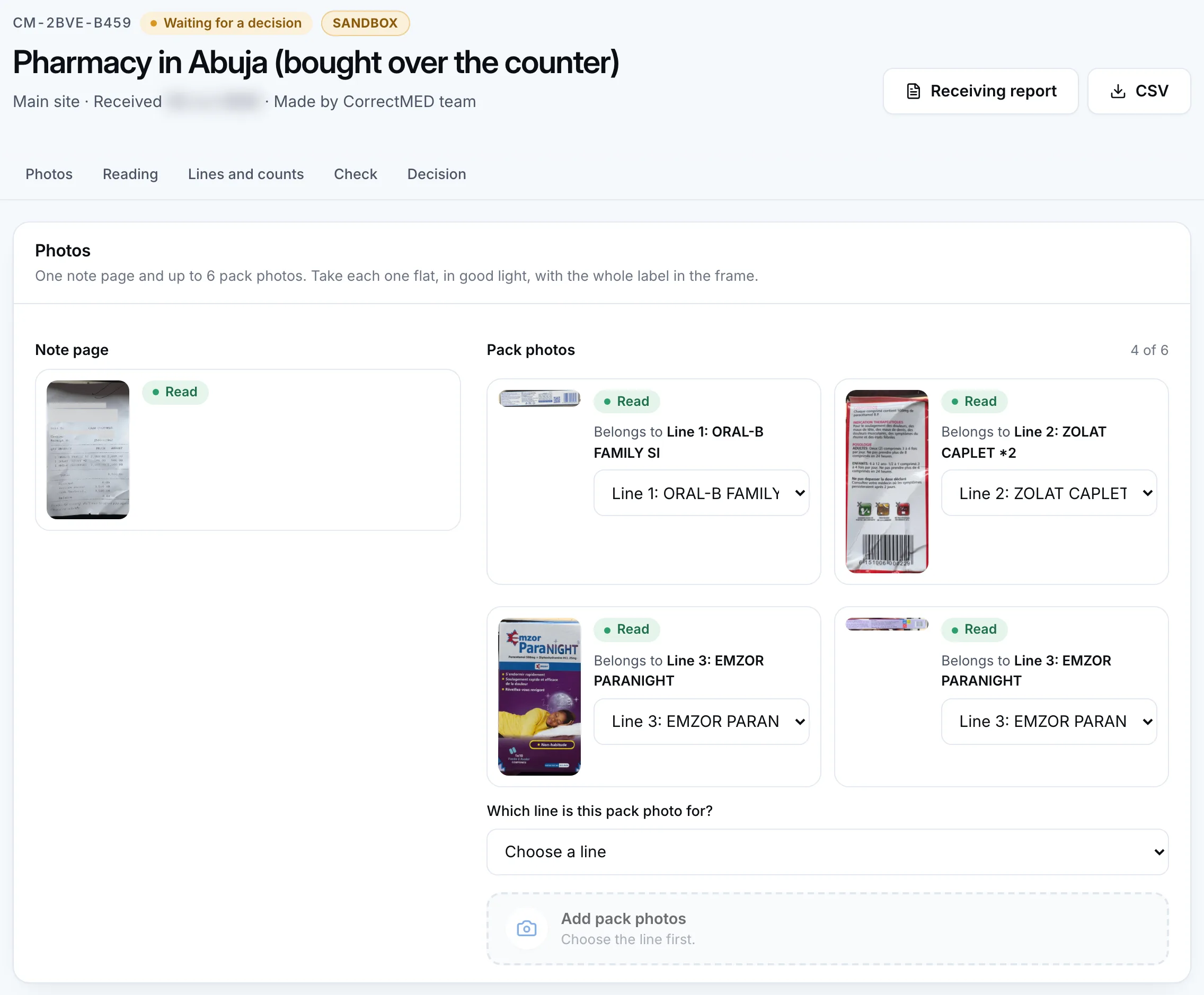
1. Photos. The receipt page header and the Photos section: the note page, four pack photos and the line each belongs to. Run dates and times are blurred. Open the full image of photos Swipe the frame to see more
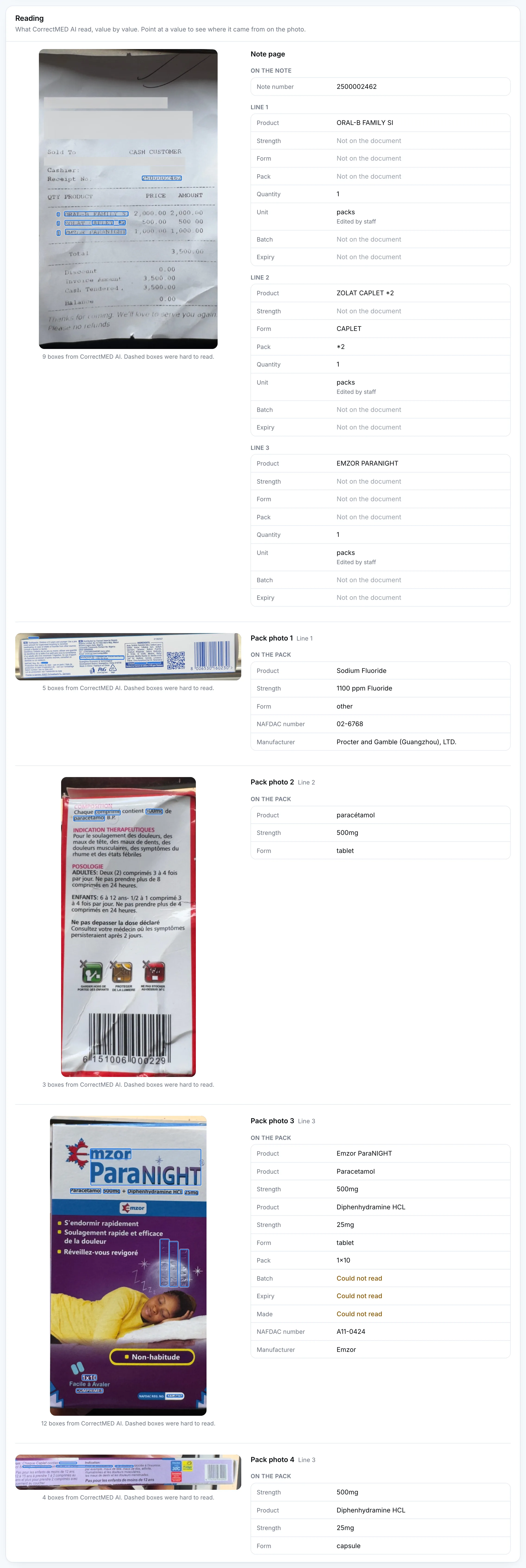
2. Reading. The Reading section: what CorrectMED AI read from each photo, with its source boxes. Open the full image of reading Swipe the frame to see more
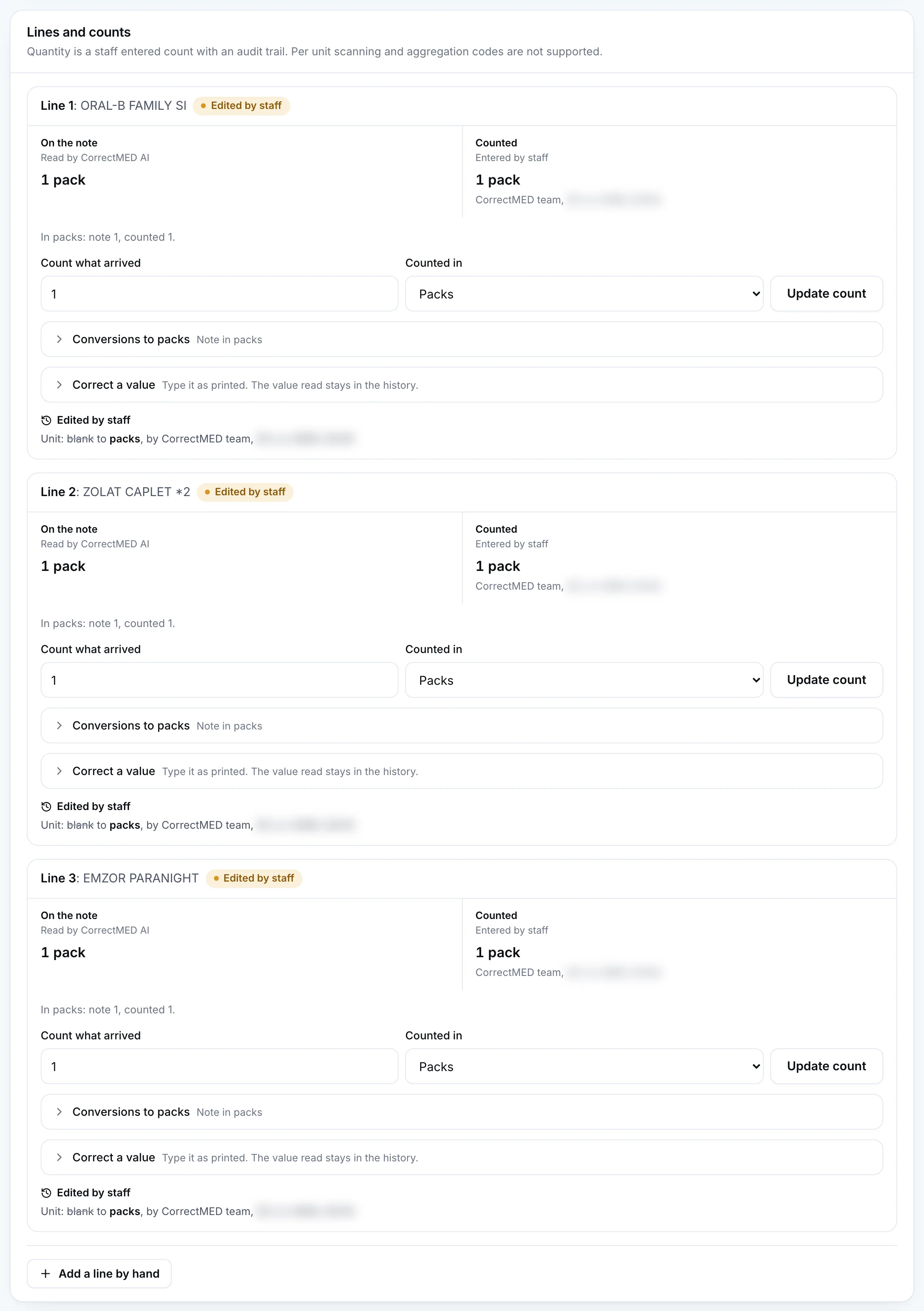
3. Lines and counts. Lines and counts: the note quantity and the team's count for each line. Run dates and times are blurred. Open the full image of lines and counts Swipe the frame to see more
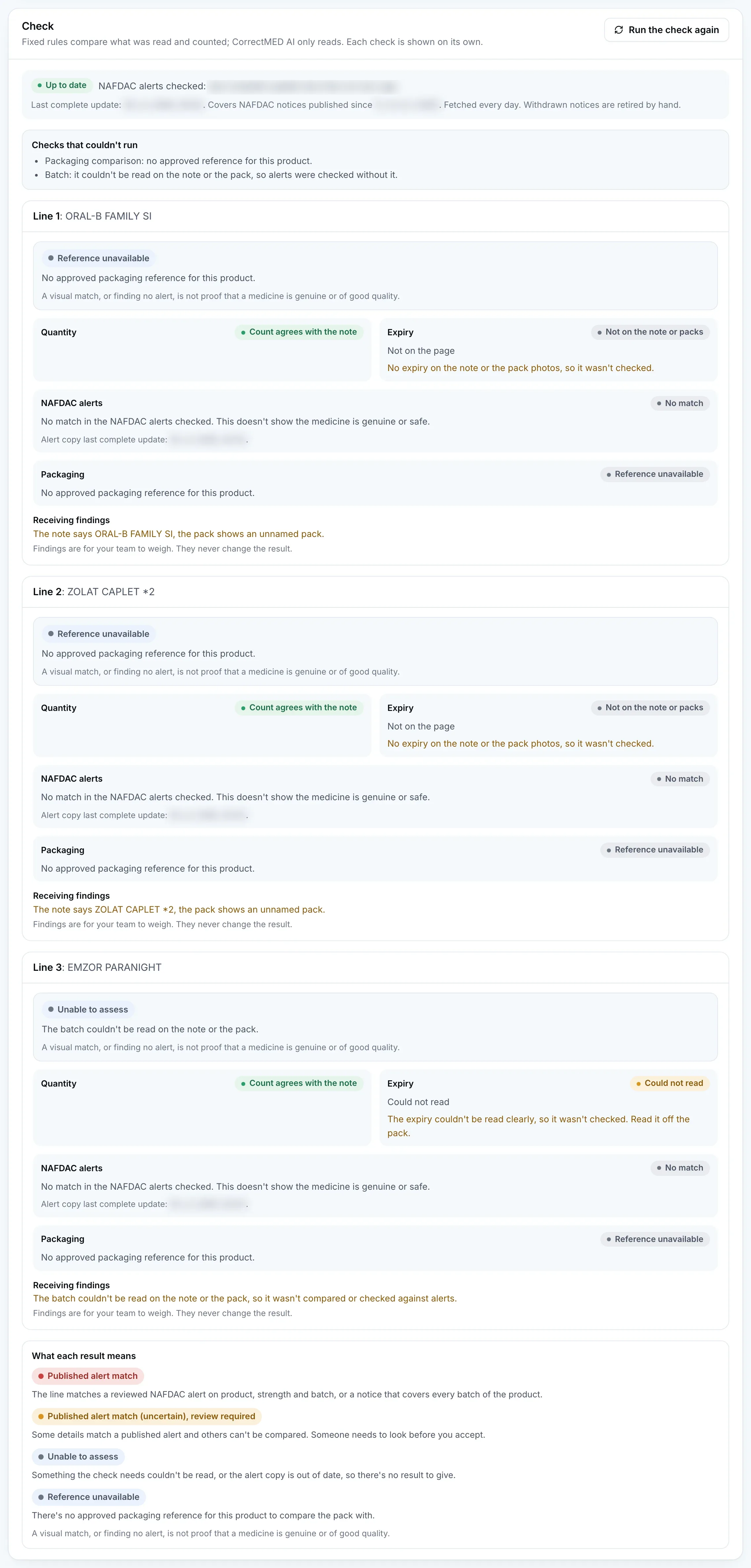
4. Check. The Check section: each line's result, quantity, expiry, NAFDAC alerts and packaging. Run dates and times are blurred. This was taken at the first check, when none of the 422 alert rows in the local copy had been approved, so every line says No match. The local test build marks the alert copy as current, which is why the green Up to date badge shows. After the alert check was run again, with 294 of the 422 rows approved, this section looked the same, because every line gave the same result. That is why there is no second image: nothing on the screen changed, and the approved rows are not visible in it. No photo was read again. Open the full image of check Swipe the frame to see more

5. Report. The receiving report page. Run dates and times are blurred. This was taken at the first check, when none of the 422 alert rows in the local copy had been approved, so every line says No match. The local test build marks the alert copy as current, which is why the green Up to date badge shows. Open the full image of report

Try it with your own delivery.
Photograph a delivery note and the packs, and see what CorrectMED reads, checks and can’t.